Zylo’s 2026 SaaS Management Index report found that the average organization runs 305 applications across the business, with many going unmanaged or underused.

What is RevOps software?
Revenue Operations (RevOps) software is a centralized platform that integrates data, processes, and tools across a company’s revenue teams (marketing, sales, and customer success) so they operate as one connected system rather than three separate ones. RevOps software:
- Centralizes data from across the funnel so every team works from the same set of figures.
- Automates manual work and the handoffs that happen when a lead moves from the marketing team to the sales team, or a customer moves from the sales team to the customer success team.
- Standardizes reporting and forecasting so leaders can trust the numbers they’re basing decisions on.
- Gives visibility into the full customer lifecycle, from first touch to renewal.
- Keeps records clean and governed as data flows between systems.
How is RevOps software different from CRM?
It’s easy to conflate RevOps software with a CRM, since they overlap heavily, but they’re not the same thing.
A CRM is a system of record that stores contact and account details, tracks deals through the pipeline, and logs the activity between a company and its customers. It’s the database that customer-facing teams build their strategies on.
RevOps software, on the other hand, operationalizes revenue across the entire funnel by connecting systems, automating processes, orchestrating team handoffs, and turning raw data into clear reporting.
In short: A CRM shows a team the current state of an account or deal, while RevOps software shows how well the entire revenue engine is running and where it’s breaking down.
These two tools aren’t in competition. In most stacks, the CRM sits at the center, and RevOps capabilities extend outward from it. Also, modern CRM platforms, like HubSpot, increasingly bake revenue operations features right into the platform, so the line between the two keeps blurring.
Featured Resource: A Guide to RevOps for Startups
Why RevOps Software Matters Across the Lifecycle
When the marketing, sales, and customer success teams work with disconnected systems (silos), no one has a complete view of the customer or the revenue associated with them.
RevOps software, however, connects those systems. Linking the tools and data across the lifecycle gives every team a shared view, effectively breaking down silos. Here are a few reasons why RevOps software is important in an organization:
1. Data Hygiene and a Single Source of Truth
When customer data is scattered across separate tools, each team has a different version of the truth.
A sales rep might update a contact in the CRM while the marketing platform still shows the old details, or a deal might close in the CRM without the customer success team knowing about it. Over time, these mismatches pile up, and teams end up making decisions on information they can’t fully trust.
RevOps software keeps a clean, current record of each contact and account that every team pulls from. It de-duplicates records, enforces formatting rules, and automatically syncs updates across systems, so a change in one place shows up everywhere.
When revenue teams all work from the same data, the debates about whose numbers are correct go away, and teams can focus on making decisions that help the business grow.
2. Cross-team Handoffs and SLAs
The path from first touch to renewal runs through a series of handoffs. Marketing passes leads to sales, and sales reps pass new customers to customer success. Every one of those handoffs is a chance for something to get dropped, delayed, or forgotten.
RevOps software makes handoffs automatic and accountable. It routes leads to the right rep the moment they qualify, triggers onboarding tasks when a deal closes, and enforces the service-level agreements (SLAs) that teams set between each other.
For example, a company might set an SLA requiring sales to follow up on a marketing-qualified lead within one hour. RevOps software tracks that clock, alerts the rep, and flags the handoff if the window is missed, so the SLA is enforced automatically rather than relying on people to remember it.
3. Forecasting and Pipeline Visibility
When pipeline data is spread across tools or entered inconsistently, forecasts become unreliable, making it hard to plan hiring, budgets, or targets. RevOps software brings pipeline data into one view and keeps it up to date. This gives leaders a clear, real-time read on the full pipeline, including:
- Deal stage and value across every rep and team
- Conversion rates between each stage of the funnel
- Deal velocity, or how long deals take to move and close
- Where deals stall or drop out most often
- Projected revenue against the target for the period
With that visibility, forecasts reflect the actual state of the pipeline rather than a rough estimate.
4. Process Automation and Less Manual Work
RevOps and sales teams often lose hours to manual tasks, like updating records, logging activity, transferring data between tools, and building the same reports every week. That work is slow, easy to get wrong, and pulls people away from selling and serving customers.
RevOps software automates these tasks. It updates fields, assigns tasks, sends internal notifications, and refreshes reports on a set schedule without requiring input from the team. So, instead of spending an hour on data entry at the start of the day, a rep can spend that time talking to customers.
5. Clear Ownership and Governance
As a company grows, its systems and data get more complex, and without rules for managing them, quality erodes. Fields get created at random, processes vary from team to team, and no one knows who owns what.
RevOps software brings structure to that sprawl. It gives teams a place to define processes, set permissions, and control how data is created and modified, so the system remains reliable as more people and tools depend on it.
Core Categories in a RevOps Platform
A RevOps platform is made up of several working parts, each handling a different piece of the revenue process.
Data Management and Centralization
A RevOps platform acts as a single source of truth, consolidating fragmented data from marketing automation platforms, CRMs, and billing software into a single place so every team works from the same records.
The platform also cleans that data — removing duplicates and correcting errors — and standardizes it so that the same field contains the same information across every system. For example, when one tool lists a company as “Acme Inc,” another as “Acme Incorporated,” and a third as “Acme,” the platform resolves them into a single, consistent record.
This gives the whole company a set of records it can rely on, and breaks down the data silos that form when each team manages its own information separately.
Pipeline and Deal Management
A good RevOps tool tracks the entire revenue engine, from the first lead through the final sale and into post-sale renewal, giving teams one place to see where every deal stands and what needs to happen next.
The platform also keeps the process consistent as deals progress. It standardizes deal stages so every rep defines “qualified” or “closed won” the same way, and automates the handoffs between teams, passing a lead to the sales team the moment it qualifies or triggering onboarding the moment a deal closes.
Automation and Workflow Orchestration
RevOps platforms use automation and workflow orchestration to handle the repetitive work that keeps revenue processes running, so teams don’t have to do it by hand.
Automation takes care of individual tasks, such as updating a field, sending an internal alert, assigning a follow-up, or logging an activity. Orchestration then connects those tasks into a complete workflow that runs across teams and tools from start to finish.
For example, when a deal closes, an orchestrated workflow might update the account record, notify the finance team to send an invoice, create the onboarding project for the customer success team, and schedule the new customer’s welcome email, all without anyone stepping in.
Analytics and Forecasting
RevOps software turns unified data into valuable insights. It provides shared dashboards that every department works from, so marketing, sales, and customer success professionals can measure performance against the same numbers instead of building separate reports.
The platform also gives leaders the analysis they need to plan. Teams can use it to:
- Forecast future revenue based on current pipeline data.
- Analyze churn to see where and why customers leave.
- Map customer lifetime value across segments.
- Measure pipeline health, including velocity and conversion rates.
Sales and Revenue Enablement
RevOps tools equip customer-facing teams with the playbooks, training, and content they need to sell and retain effectively. It puts the right materials in front of reps at the moment they need them, rather than leaving them to dig through folders or rebuild assets from scratch.
The platform also keeps messaging consistent across the team. When sales reps and customer success managers all work from the same approved playbooks and content, customers get a consistent message from first pitch through renewal, which makes it easier to convert new accounts and keep existing ones.
System Integration
A RevOps platform manages the technology infrastructure by connecting the specialized tools a company already uses, such as email platforms, billing software, and intent data tools. It keeps them communicating, so data moves cleanly from one to the next.
Those connections are what prevent the bottlenecks that slow down revenue teams. When a stack’s tools share information automatically, no one has to export a file from one system and load it into another by hand.
Best RevOps Software to Explore in 2026
There’s no single best RevOps tool, only the best fit for a team’s size, stack, and goals. The seven tools below cover a range of needs, from specialized jobs to unifying the whole revenue process.
1. HubSpot Data Hub and Smart CRM
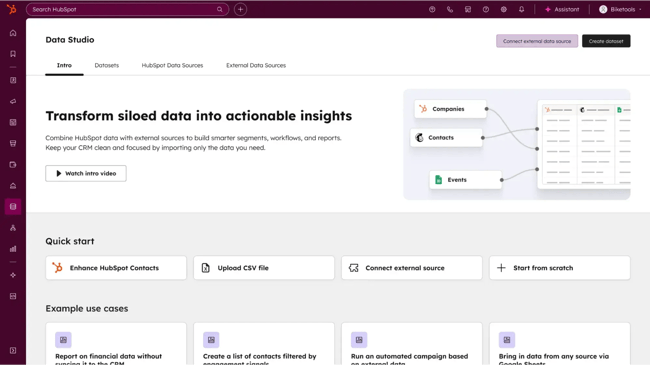
HubSpot Data Hub is a centralized data platform that unifies, cleans, and activates customer data across a company’s tech stack. It replaces fragmented databases that leave each team with its own version of a customer, giving marketing, sales, and service teams one source of truth to work from.
Data Hub is one of six HubSpot products (Marketing Hub, Sales Hub, Service Hub, Content Hub, Data Hub, and Revenue Hub), all built on top of HubSpot’s Smart CRM. Because every hub runs on the same CRM, the teams using them work from a single customer record rather than syncing data between separate tools.
That shared foundation is the exact alignment RevOps teams are after: one set of data that all customer-facing teams can base their decisions on.
Key Features
- Bi-directional syncing: Instead of just sending data one way, Data Hub keeps HubSpot and your other apps (like Microsoft Dynamics, NetSuite, or Zendesk) constantly talking back and forth.
- Data quality tools: AI-powered monitoring spots duplicates, formatting issues, and gaps, then fixes as many as it can automatically to keep records clean at scale.
- Data Studio: Allows RevOps to create unified datasets from multiple sources (like product usage or finance data) using a visual, spreadsheet-like interface — no developer required
- Programmable automation: Teams can create custom rules to standardize and correct data as it comes in, so formatting stays consistent across every record.
- Dashboards and reporting: Shared dashboards give marketing, sales, and service teams one reporting view, so every team measures against the same numbers.
Beyond Data Hub, HubSpot as an ecosystem includes other tools RevOps teams can use to unify processes across departments, including:
- Data enrichment: HubSpot’s embedded AI features fills in missing company and contact details automatically, so records stay complete without manual research.
- Conversation intelligence: HubSpot records and transcribes sales calls, then surfaces insights and coaching moments that can help sales reps close more deals.
- Meeting scheduler: Prospects can book meetings with a rep straight from a shared calendar link, cutting out the scheduling back-and-forth.
- Email marketing: Marketers can run email campaigns, automation, and nurture sequences off the same contact data that the other teams use.
- CPQ tool: The CPQ tool can configure products, generate quotes, and collect payments, connecting everything to the deal record in the CRM.
Best for: Teams that want to unify, clean, and connect customer data across their stack, especially those already building on HubSpot.
Pricing: Teams can start using Data Hub for free. The Starter plan costs $7/month per seat, and the Professional plan costs $720/month with one seat included. Teams can request a demo here and start a 14-day free trial here.
What I like: HubSpot stands out because it’s a true ecosystem. Once a team uses HubSpot, it no longer needs to buy a separate email marketing platform, conversation intelligence tool, prospecting tool, and CPQ system, and then figure out how to connect them all.
HubSpot already has all these capabilities, and teams only have to pay one bill without worrying about integrations.
2. Agentforce Revenue Management
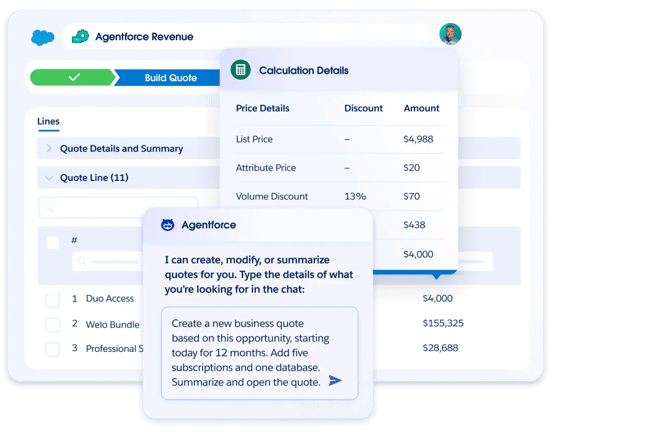
Formerly known as Salesforce Revenue Cloud, Agentforce Revenue Management handles the messiest part of enterprise selling: turning a complicated deal into an accurate quote and a clean contract.
This platform has an incredibly powerful CPQ (Configure, Price, Quote) engine that enables global sales teams to generate multi-million-dollar contracts with custom discounts, bundles, and pricing tiers without breaking any corporate pricing rules. This prevents sales reps from sending incorrect price quotes or outdated legal contracts to buyers.
Because it runs on the Salesforce platform, this tool connects quoting, contracts, billing, and renewals to the same customer data the sales team already works with, so a deal moves from quote to cash in one place.
Key Features
- CPQ and automatic quoting: Reps generate, update, and send quotes quickly, with AI drafting the quote itself and pricing rules detecting any errors before it goes out.
- Product configurator: A Constraint Builder lets teams define the rules and constraints that help sellers assemble accurate quotes for complex products.
- Contract lifecycle management: Legal teams build approved templates and clause libraries, and AI-assisted redlining speeds up negotiation while keeping contracts compliant with preapproved terms.
- Asset and subscription management: Reps can see everything an account owns and amend, renew, or cancel live deals. They also get real-time visibility into recurring revenue metrics such as MRR and ARR.
- Revenue analytics: Dashboards track pricing performance, subscription revenue, order health, and billing, giving leaders a read on margin, churn risk, and revenue recognition all in one place.
Best for: Enterprise and global sales teams that want to quote and contract complex, high-value deals without breaking their own pricing rules.
Pricing: The pricing for Agentforce Revenue Management isn’t publicly available. The platform is sold on a custom quote tied to a company’s Salesforce setup, so enterprise buyers need to speak with a sales rep and allocate a budget for implementation.
What I like: I like that the pricing guardrails in the Agentforce Revenue Management tool help reps adhere to the company’s pricing rules even as they generate quotes for complex deals/products. This reduces the chances of the wrong quote reaching the buyer.
3. Clari
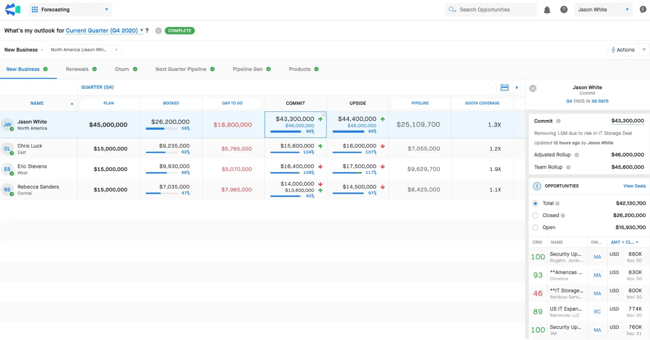
Clari is an enterprise revenue orchestration platform that acts as the predictive brain for an executive team. It connects to the CRM, email, and calendar to gauge how likely each deal is to close, then uses AI to analyze historical data and project revenue for the period.
Instead of asking reps to guess how much money they’ll bring in, leadership gets a revenue forecast grounded in how deals have actually behaved in the past. When a deal starts to look risky, Clari flags it early, giving leaders time to step in before a quarter ends short.
Key Features
- AI forecasting: Clari builds forecast rollups across reps, teams, and regions and scores each deal on its likelihood of closing.
- Deal inspection: Opportunity health scores and deal change alerts indicate which deals are progressing and which have stalled, allowing managers to focus on deals that are slipping.
- Autocapture: Clari automatically pulls activity data from email and calendar into the CRM, so records stay current without reps having to log every call and meeting by hand.
- Conversation intelligence: Clari Copilot records and analyzes sales calls, surfacing objections, next steps, and coaching moments tied back to the deals in the pipeline.
- Pipeline management: Coverage views show where the pipeline is solid and where it’s thin, so teams can know just how much of their target is actually in reach.
Best for: Enterprise revenue teams that want AI-driven forecasts they can trust.
Pricing: Clari’s pricing isn’t publicly available. Teams have to reach out to the team for a custom quote.
What I like: I like that Clari flags a deal that’s stalling weeks before the quarter closes, so there’s time to act. I also like the auto-capture feature that keeps CRM data up to date without requiring reps to log every call and meeting. This reduces the chances of errors happening and frees up reps to do more strategic work.
4. Gong
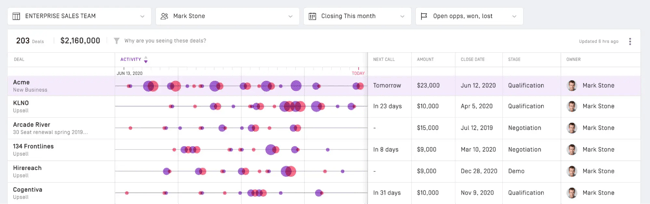
Gong is a conversation intelligence tool. Its AI joins video meetings, records phone calls, and analyzes emails to surface what’s driving deals: which product features buyers ask about, which objections keep coming up, and which competitors get mentioned and when.
This gives sales leaders a factual basis for coaching reps and building the sales playbooks, battlecards, and scripts that help the team handle tough questions and win more deals.
Key Features
- Automatic capture: Gong records and transcribes calls and meetings across Zoom, Teams, and phone, and it analyzes sales emails too. This means reps no longer have to take notes mid-conversation, and managers don’t have to sit in on every call.
- Conversation analysis: Gong flags when specific topics, objections, pricing questions, or competitor names come up, so leaders know exactly what to focus on when coaching reps on how to win deals.
- Deal insight: By reading the actual back-and-forth with a buyer, Gong surfaces which deals are progressing and which have stalled.
- Coaching: Managers can review recorded calls and leave feedback tied to specific moments. They can also use calls done by top reps to coach new sales hires, which shortens their ramp time.
- Enablement from real calls: Gong Enable builds training and practice scenarios from a company’s own customer conversations, so reps learn from situations they’ll likely face rather than from generic examples.
Best for: Sales teams that want to coach reps and sharpen their messaging based on what actually happens on customer calls.
Pricing: Gong’s pricing isn’t publicly available, so teams have to book a demo.
What I like: I like that Gong helps sales leaders coach reps using recorded calls. Instead of guessing why a rep is missing quota, a manager can watch how the rep handles an objection or a pricing question and give feedback on that specific part of the call.
I also like the competitor and objection tracking. When a manager can see that a certain competitor keeps coming up, or that reps keep stumbling on the same objection, they know exactly how to prep the team, whether that’s a battlecard with counterpoints or a script for answering that objection.
Featured Resource: Conversation Intelligence: What It Is and How It Improves Productivity Among Sales Reps
5. Clay
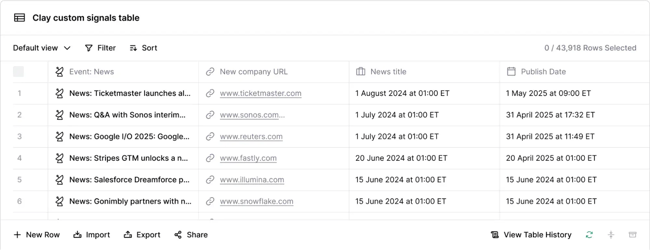
Clay is a modern, spreadsheet-like tool that allows revenue, marketing, and sales teams to pull data from over 100 providers, automate complex web research, and execute hyper-personalized outreach at scale.
Instead of paying for multiple database subscriptions, a rep can simply type a company’s website into Clay, and the platform will automatically scrape LinkedIn, news articles, and corporate sites to find the emails and job titles of decision-makers, as well as the company’s tech stack.
This saves reps hours of manual Google research and ensures they only spend time reaching out to highly qualified buyers.
Key Features
- Waterfall enrichment: Clay checks one data provider after another to fill in a missing email or phone number. If the first source comes up empty, it moves to the next, which produces far better coverage than any single provider alone.
- Claygent: An AI research agent that automatically scans the web, scrapes company websites, reviews portals, and synthesizes insights to write tailored outbound messaging.
- Data marketplace: One Clay contract gives a team access to over 150 data and AI vendors, so there’s no need to manage separate agreements with each provider.
- Lead scoring: Clay scores and ranks leads using firmographic data and live intent, then routes the top ones to the right rep, so the team works the accounts most likely to convert first.
- Signals and intent: Clay tracks triggers like job changes, promotions, funding rounds, new hiring, website visits, and technology usage to time and prioritize when prospects are most likely to convert.
Best for: Revenue and marketing teams that want to enrich lead data and score prospects without juggling a dozen separate database subscriptions.
Pricing: Clay offers a free plan with 1,200 data credits a year. Paid plans start at $167/month, billed annually. Enterprise pricing is custom.
What I like: Clay helps sales teams skip the manual research that eats into selling time. With Clay, a rep can get a prospect’s role, recent company news, and tech stack in just a few minutes, so they know exactly what to say and do once they get on a call.
6. LeanData
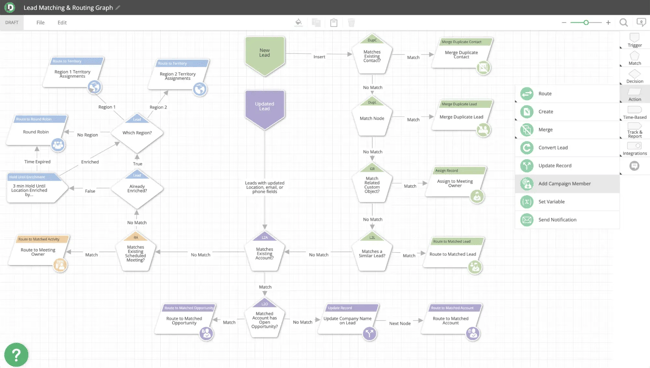
LeanData is a revenue orchestration platform that helps teams solve the headache of lead ownership inside Salesforce. It features a drag-and-drop interface that allows RevOps managers to map out exactly where a lead should go based on its attributes and the actions it takes.
Say a prospect fills out a demo request form. LeanData checks whether that person already matches an existing account, and if they do, it sends the lead straight to that account’s owner. If the company is new, it assigns the lead through a round-robin to an available rep in the right territory. All of this happens in seconds, without a manager touching the record.
Key Features
- Visual routing builder: RevOps teams map lead flows on a no-code, drag-and-drop canvas, laying out every branch and rule visually (no code required).
- Lead-to-account matching: LeanData matches incoming leads to the right account in Salesforce with high accuracy, so a new lead from an existing customer reaches the right account owner.
- Round-robin and territory assignment: Leads are distributed evenly across reps based on territory, availability, and workload. This keeps the assignment fair and stops leads from piling up on one person.
- BookIt scheduling: Qualified prospects can book a meeting with the right rep straight from a web form, cutting out the back-and-forth that usually delays a first conversation.
- Audit logs: Every routing decision is logged and traceable, so when a lead ends up in the wrong place, an admin can see exactly which rule sent it there and fix it.
Best for: Salesforce-based companies that need to route leads through complex ownership rules without writing custom code.
Pricing: LeanData’s pricing is not publicly available, so teams have to request a demo and get a custom quote.
What I like: I like that the routing logic is laid out visually instead of hidden in code. So, when a lead lands with the wrong rep, an admin can open the flow, follow the branches, see precisely where it went sideways, and fix the issue quickly.
7. Workato
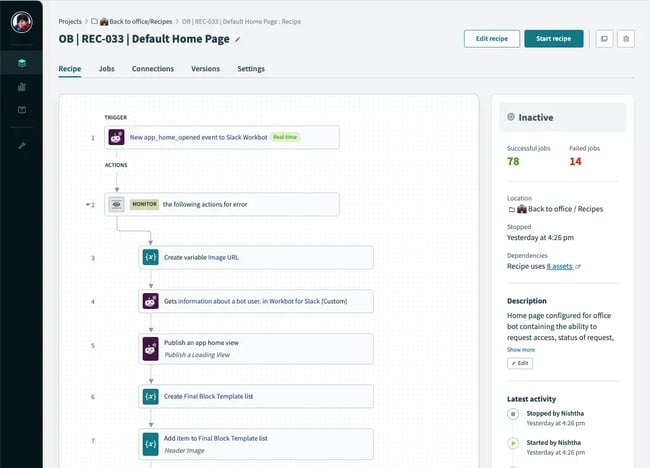
Workato is an iPaaS (Integration Platform as a Service) that serves as a secure digital highway, enabling a company’s software applications to exchange data securely. Teams connect their systems using low-code “recipes,” which are automated workflows that link one app to another.
Workato is most useful for systems that have no native connection between them. For example, instead of paying an engineer to write custom API code, a company can use Workato to connect its CRM directly to an enterprise financial tool like NetSuite, so closed deals flow into billing without anyone entering information by hand.
Key Features
- Low-code recipes: Teams build automations as recipes made of triggers and actions, with conditional logic for different outcomes. Most of it is done through a visual builder rather than written code.
- Large connector library: Workato offers over 1,000 prebuilt connectors for enterprise apps like Salesforce, NetSuite, Workday, SAP, and Slack, so the common integrations are ready to use out of the box.
- Enterprise governance and security: Role-based access, audit logs, and monitoring come built in, which gives IT the oversight and compliance controls a large organization needs.
- Error handling and monitoring: Workato retries failed jobs automatically and alerts the team immediately if something breaks.
- Custom connectors and API management: For proprietary or niche systems without a prebuilt connector, teams can build custom connections and manage their own APIs on the platform.
Best for: Large organizations that need to connect many enterprise applications securely, without building custom integrations from scratch.
Pricing: Workato’s pricing isn’t publicly available, so teams have to request a demo.
What I like: I like that Workato keeps an eye on the integrations it runs. When one breaks, it retries the job and alerts the team right away instead of letting it go unnoticed. That’s important because when a broken integration isn’t fixed on time, the bad data spreads to every system connected to it.
How to Evaluate RevOps Software
Evaluating RevOps software is like choosing a new engine for a sports car. It needs to be powerful enough to speed up the business, but flexible enough to fit perfectly with the parts already in place. To find the right platform, teams should evaluate vendors across six core criteria.
1. Data Integration
A RevOps platform is useless if it can’t talk to a company’s existing software. Before making a choice, teams should confirm that the tool can integrate data from marketing, sales, customer success, and finance into a single source of truth.
- Native connectors: Look for plug-and-play integrations with core tools, such as HubSpot, Marketo, and Constant Contact.
- Bidirectional syncing: Data should flow both ways in real time. If a salesperson updates a lead’s phone number, the marketing tool should reflect the change instantly.
- API flexibility: The platform should ideally have an open API (application programming interface) so a tech team can connect custom or niche tools later.
2. Automation Capabilities
The platform should eliminate boring, repetitive manual work so teams can focus on selling and helping customers.
- No-code builders: Managers across teams should be able to build workflows using simple drag-and-drop visual tools without needing a coder.
- Lead and opportunity routing: The software must handle complex rules to instantly send leads to the right rep based on territory, company size, or industry.
- Data cleaning rules: It should automatically find and remove duplicates, format phone numbers, and flag missing information.
3. Analytics and Forecasting Precision
A good RevOps platform should do more than just show pretty charts. It must provide deep insights and highly accurate predictions.
- AI-driven forecasting: The software should look at past sales trends to predict future revenue with high accuracy.
- Pipeline inspection: It must flag “at-risk” deals — like an account where the client has stopped replying to emails.
- Cross-department reports: Teams should be able to see the entire customer journey in one report, from the first ad they clicked to their latest renewal contract.
4. User Adoption and Ease of Use
The best software in the world will fail if the teams hate using it. The RevOps platform of choice should be intuitive and useful to the people working with it every day.
- Clean interface: The screens and dashboards should be easy to navigate without weeks of intense training.
- In-line enablement: Look for platforms that deliver tips and playbooks right inside the tools reps use to talk to prospects and leads each day.
- Mobile access: Reps who work on the road need a smooth mobile app so they can update deals from anywhere.
5. Scalability and Customization
The RevOps software a company buys today needs to fit its business three to five years from now, when it has more products, more employees, and more customers.
- Custom objects: The platform should let teams create custom data categories unique to their business model. For example, a company that leases equipment rather than sells it might need a “Rental Agreement” object to track lease terms, return dates, and renewal schedules, none of which fit neatly into a standard deal or contact record.
- Global support: For a company expanding into different countries, the platform must support multiple currencies, languages, and local data privacy laws, such as GDPR and the CCPA.
- Tiered pricing: The pricing structure should be transparent, so a team knows exactly what it will cost as they add more users or features.
6. Security and Compliance (The “Lockbox” Test)
Because a RevOps platform holds all of a company’s customer and financial data, it must be secure enough to protect the business from leaks and legal trouble.
- Certifications: Look for industry-standard security badges like SOC 2 Type II and ISO 27001.
- Role-based permissions: The platform should give teams precise control over who can see what. For example, a junior rep shouldn’t be able to export the entire customer list.
A Simple Evaluation Checklist
When interviewing RevOps software vendors, companies should ask them these quick questions to see if they pass the test:
- “Can you show me a live demo of your platform syncing data with our exact CRM in real-time?”
- “What percentage of our data cleaning and lead routing can be fully automated on day one?”
- “Does your forecasting feature rely entirely on human input, or does it use AI to analyze historical behavior?”
- “What kind of onboarding, training, and ongoing support is included, and what costs extra?”
- “How long does the average implementation take for a company of our size?”
- “What does total pricing look like at our current size, and how does it change as we add users, contacts, or features over the next few years?”
- “How do you handle data security and compliance, and which certifications can you show us?”
How AI Changes RevOps Software
AI has shifted RevOps software from a system that records what already happened to one that predicts what’s likely to happen next.
Legacy RevOps platforms could show a team its pipeline and its conversion rates, but AI-enabled ones read the patterns in that data and show teams where a deal is heading, which lead is worth a rep’s time, and which account is at risk of leaving.
This comes down to the software being able to spot patterns across far more data than a person could review manually — and in a fraction of the time. It learns from a company’s history of won deals, lost deals, and customer behavior, then applies what it finds to the records moving through the funnel right now. In practice, AI in RevOps software handles work like:
- Scoring and ranking leads based on how closely they match past buyers.
- Forecasting revenue from historical patterns rather than manual estimates.
- Flagging deals that have stalled or accounts showing signs of churn.
- Cleaning and deduplicating data on a large scale.
- Summarizing sales calls and logging the activity automatically.
- Suggesting the next best action for a rep to take on a given deal.
The catch, however, is that AI works on probability, not certainty.
AI draws conclusions from historical data, which means it can be confidently wrong when the situation it’s analyzing doesn’t match the patterns it learned from. For example, a forecast built on last year’s buying behavior can miss a shift in the market, and a lead score trained on past customers can overlook a strong prospect that doesn’t fit the mold.
That’s why the safest setups keep AI in an advisory role for anything consequential and leave the final call to a person. AI can handle the data volume and surface recommendations, but only a human rep can apply the context the model doesn’t have. Human oversight matters most in situations like:
- Final revenue forecasts that leadership will report or plan against.
- Decisions that affect employee compensation, headcount, or budget.
- Edge cases and high-value accounts where the data is thin or unusual.
- Reviewing anything AI writes for a customer, like an email or reply, before it goes out.
The takeaway: Businesses should let AI do what it does well, which is process scale and spot patterns, while keeping people responsible for judgment, exceptions, and anything with real stakes attached.
Sample RevOps Stacks By Company Size
There’s no single correct RevOps stack. The right one depends on how big a company is, how complex its sales motion is, and how much of its process is worth automating yet. For instance, a three-person startup and a 2,000-person enterprise both need clean data and connected teams, but they get there with very different tools. Here are three sample RevOps stacks categorized by company size.
1. The Startup CRM-first Stack (Early Stage / $0–$5M ARR)
Early-stage companies should keep the stack small and let the CRM do most of the work. At this stage, the biggest risk is buying tools for problems the company doesn’t have yet, only to spend more time managing software than selling. A lean startup stack usually covers three things:
- CRM: HubSpot is a great platform to use, since its free edition lets a team get started without upfront cost. It handles data management, email marketing, pipeline visibility, deal management, reporting, and customer support tickets in one place. Pipedrive is another option for small sales teams that want something simple.
- Meeting scheduling: A tool like HubSpot’s built-in meeting scheduler or Calendly lets prospects book meetings directly onto a salesperson’s calendar without any back-and-forth.
- Light automation: Native CRM workflows or Zapier can handle basic automated tasks, such as sending a Slack notification when a new deal closes. They can also be used to connect the other apps the team uses.
Budget estimate: Around $200 to $1,000 per month.
2. The Mid-market Growth Stack (Scale-Up / $5M–$20M ARR)
Once a business has distinct marketing, sales, and customer success teams, the stack must grow to support a larger pipeline, more handoffs, and more accurate forecasting. This is where dedicated tools for engagement, enrichment, and revenue intelligence start to earn their place. A mid-market stack typically includes:
- CRM: Again, HubSpot works great here. A paid HubSpot plan unlocks custom data tracking, advanced reporting, and strict data rules, and is designed to be more self-serve than Salesforce.
- Marketing automation: Marketing Hub is built for targeted, multi-stage campaigns and revenue tracking, and using it automatically syncs attribution and lead data to Smart CRM (so no need to pay for separate tools). Teams not using HubSpot can also opt for Marketo.
- Customer engagement: HubSpot’s email marketing software helps customer-facing teams engage with prospects at scale. Other tools include Outreach and Salesloft.
- Data enrichment: HubSpot’s data enrichment tool can automatically research leads, fill in missing corporate data in the CRM, and score them instantly. Other options include Apollo.io and ZoomInfo.
- Scheduling & smart routing: Again, HubSpot’s meeting scheduler works here. Other options are Chili Piper or LeanData, which instantly route complex incoming leads to the right account executive based on geographic territory or company size.
- Revenue intelligence: HubSpot has a conversation intelligence tool that records and analyzes sales calls to surface coaching opportunities, track how reps handle objections, and identify competitive trends across conversations. Other options include Gong and Clari.
Budget estimate: Around $8,000 to $25,000 per month.
3. The Enterprise “Integrated” Stack ($20M+ ARR)
At this scale, a company has thousands of customers, multiple product lines, and global teams, and it can no longer rely on software to sync natively. Instead, it builds a custom infrastructure in which a central data lake serves as the ultimate source of truth. An enterprise stack generally includes:
- CRM & ERP: Salesforce is the common choice for complex sales processes, multiple business units, or deep customization needs, though it requires dedicated admin capacity to run well.
However, more enterprises are turning to HubSpot because it consolidates CRM, marketing, sales, service, and quoting on a single platform and reduces the integration work of stitching together separate systems.
- ERP: A system like NetSuite or Microsoft Dynamics 365 for managing finance, invoicing, and revenue recognition. For enterprises, CRM and CPQ tools must sync cleanly with the ERP so that closed deals flow into billing and financial reporting without manual re-entry.
- Marketing automation: HubSpot’s Marketing Hub for teams that want campaigns, attribution, outreach, and lead data in the same platform as the CRM, or Marketo for organizations running highly complex multi-touch programs across large audiences.
- Data warehouse and BI: A central warehouse (such as Snowflake or BigQuery) paired with business intelligence tools like Tableau or Power BI for analysis.
- Reverse ETL: Platforms like Fivetran or Hightouch tools take computed insights from your data warehouse and push them back into the daily tools your sales reps use.
- Integration platform (iPaaS): Workato or Tray.io to orchestrate workflows across many systems or apps, while monitoring for security compliance and system errors.
- Enterprise enablement: Tools like Highspot or Seismic to manage all sales training documents, legal pitches, and case studies at a global scale.
- CPQ and billing: HubSpot’s built-in CPQ software can configure products, apply pricing rules, and generate quotes directly from the deal record, then carry a signed quote through to invoicing, billing, and payments without a separate system.
For more complex configuration needs, tools like DealHub or Zuora are great options.
Budget estimate: $50,000+ per month (often scaling into multi-million dollar annual contracts
Frequently Asked Questions About RevOps Software
Is RevOps one platform or a stack?
RevOps can be either just one platform or a stack, but the right answer depends on how big and complex the business is.
Smaller companies often get everything they need from a single platform, like HubSpot, where the CRM, automation, and reporting already work together, so there’s nothing to integrate. Larger organizations, on the other hand, tend to use a stack of specialized tools connected around a central CRM, since no one platform covers every need at scale.
Do I need RevOps if I already have a CRM?
A CRM is the foundation of RevOps, but it isn’t the entire thing. The CRM stores customer and deal data, while RevOps puts that data to work across marketing, sales, and customer success by automating handoffs, standardizing reporting, governing data quality, and keeping teams aligned. A company can run a solid CRM and still have siloed data, broken handoffs, and forecasts no one trusts.
Keep in mind that RevOps is a practice, not just a type of software, and a capable CRM can handle much of it. So the real question isn’t whether to replace the CRM, but whether the company has the alignment and visibility that the CRM alone doesn’t provide.
What should I automate first in RevOps?
Start with the work that’s frequent, repetitive, and low-risk, where automation pays off quickly, and there’s little that can go wrong.
Data hygiene is usually the best first move, since deduplicating records and standardizing fields improves everything built on top of that data. Lead routing and handoff triggers are close behind because they eliminate delays and ensure nothing gets dropped between teams.
Leave the judgment-heavy work for later. Once the basics run cleanly, more complex orchestration across multiple teams and tools becomes the next step.
How do I measure RevOps success?
Some useful RevOps metrics include forecast accuracy, pipeline velocity, conversion rates between funnel stages, lead response time against SLA, and retention/churn. Together, they show whether the revenue engine is running more predictably.
Operational metrics help too, as long as they’re read in context. Data quality, hours saved on manual tasks, and tool adoption all show whether the systems are working. Just avoid measuring effort, like emails sent or activities logged, instead of the results that effort produces.
Unify your revenue teams with HubSpot Data Hub and Smart CRM.
Disconnected tools and siloed data cause leads to go cold, handoffs to fall apart, and reports to clash, all of which cost companies money. But with the right RevOps tool, organizations can unify all data, tools, and processes, so customer-facing teams work from the same source of truth.
For teams that are still weighing their options, HubSpot Data Hub is a strong choice. It aggregates and cleans customer data across all teams, then connects it to Smart CRM that powers the rest of HubSpot. So, instead of managing a scattered stack, teams run their entire revenue process in one place.