With AI meeting assistants, conversations have more weight, notes are documented in sections, and the small details that drive deals forward stop slipping through the cracks.
 What is an AI meeting assistant?
What is an AI meeting assistant?
An AI meeting assistant is like a teammate who never forgets a detail. It joins calls, records what’s said, and turns the conversation into clear AI meeting notes, summaries, and action items without anyone needing to scribble or type. AI meeting assistants keep track of who’s doing what and pull out insights someone might’ve missed in the moment.
Do you need an AI meeting assistant if Zoom or Teams already has AI?
The short answer is, it depends. AI meeting assistants provide capabilities beyond what Zoom or Teams’ built-in AI offers, particularly for B2B teams working across multiple platforms. Zoom and Teams AI can handle basic summaries, transcriptions, and quick recaps for internal meetings. However, dedicated AI meeting assistants deliver three key advantages:
- Consistent meeting intelligence across all platforms.
- CRM integration with smarter, actionable outputs.
- And sales coaching data that improves team performance.
Dedicated AI meeting assistants also provide enterprise-grade security and compliance controls that built-in AI typically lacks. For teams that conduct meetings across Zoom, Teams, and other platforms, a dedicated assistant ensures every conversation is captured, analyzed, and integrated into workflows regardless of where the meeting takes place.
Here are five scenarios where stand-alone AI meeting assistants excel.
- Customer and sales meetings. Dedicated assistant pushes notes, action items, and deal risks directly into the CRM instead of leaving them in isolated call summaries, ensuring sales teams have actionable information for every deal.
- User interviews and product research. AI assistants compare insights across multiple interviews rather than analyzing calls individually, helping product teams identify patterns and themes that inform roadmap decisions.
- Hiring and candidate interviews. Meeting assistants analyze candidate answers, tag competencies automatically, and generate structured scorecards that enable fair, data-driven hiring decisions across interview panels.
- Customer success and onboarding. AI tools identify churn signals early, track follow-up commitments, and align cross-functional owners to prevent customer issues from slipping through the cracks.
- Meeting consolidation. Standalone assistants unify notes and recordings from every platform into a single, searchable knowledge base, eliminating fragmentation.
Best AI Meeting Assistants for B2B
The best B2B meeting assistants take notes during meetings and over high-level overviews. These tools also connect with the team’s existing tech stack, including their CRM. Sales Hub’s prospecting agent has these capabilities baked in.
We took a look at how Sales Hub’s prospecting agent compares to four other popular solutions across several key factors. See how leading options stack up.
|
Impact Lever |
tl;dv |
Otter.ai |
HubSpot Sales Hub Prospecting Agent |
Fireflies.ai |
ClickUp AI Notetaker |
|
CRM Sync Depth |
Native sync with HubSpot & Salesforce, others via Zapier (limited native scope) |
Deep integrations with HubSpot, Salesforce, Dynamics, Zoho, Monday.com |
Fully embedded in HubSpot CRM, syncs deals, contacts, and meetings |
Broad CRM sync (HubSpot, Salesforce) but some manual setup |
Works only within ClickUp workspace; no external CRM sync |
|
Coaching & Analytics |
Basic AI highlights and searchable summaries |
Provides conversation highlights but limited team-level coaching |
Contextual prep + follow-up suggestions based on CRM data |
Offers talk-time, sentiment, and topic tracking, plus query insights |
Limited analytics; focuses on structured capture, not coaching |
|
Action Item Fidelity |
Extracts decisions & tasks; syncs into workflows via Slack/Notion |
Allows comments & highlights inside transcripts |
Auto-generates follow-ups and syncs them into CRM deals |
Automatically extracts key tasks and searchable action items |
Transcripts link directly to ClickUp tasks and Docs |
|
Bot vs. Botless |
Bot-based — Joins meetings automatically on Zoom, Meet, Teams |
Bot-based (OtterPilot) — Auto-joins meetings and records |
Botless / Native — Runs natively inside HubSpot (no external bot join needed) |
Bot-based (Fred/Fireflies) — AI bot joins meetings or uploads files |
Bot-based hybrid — ClickUp Notetaker joins meetings via platform integration |
|
In-Person Support & Training |
Primarily self-serve; email/chat support |
Help center + community; limited live training |
Supported through HubSpot’s enterprise customer success & onboarding |
Self-serve; limited enterprise onboarding |
Dedicated onboarding via ClickUp’s enterprise support |
|
Data Controls & Compliance |
Stored in tl;dv cloud; limited enterprise compliance |
Standard SaaS compliance, data stored in Otter cloud |
Native HubSpot compliance (GDPR, SOC 2) |
Compliant storage; may require user review for sensitive data |
GDPR, ISO, HIPAA aligned; no third-party AI training on data |
|
Pricing at a Glance (B2B relevance) |
Free + Paid tiers; CRM sync & AI summaries on paid plans |
Free + Paid; CRM and Zapier access only on paid plans |
Included in Sales Hub Pro/Enterprise (high-value for existing HubSpot users) |
Free + Paid; deeper analytics/storage in higher tiers |
Add-on AI fees on top of ClickUp workspace plan |
1. Sales Hub Meeting Assistant
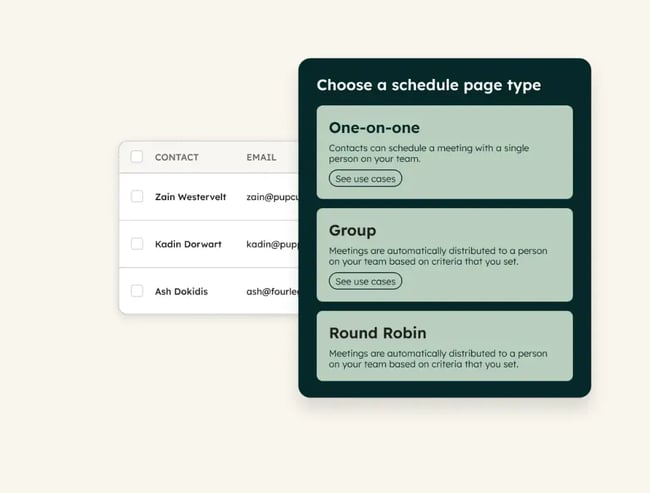
Sales Hub meeting assistant lives inside HubSpot’s Sales Workspace and is a part of the platform’s scheduler tool. The tool is designed to streamline meeting prep and follow-up. Meeting capabilities appear on the Schedule Tab and support meetings that include at least one external contact.
Before each call, HubSpot surfaces attendee insights, deal details, and company information to ensure teams arrive prepared. Afterward, it automatically generates summaries, follow-up suggestions, and saves the transcript and recording. The tool excels at keeping everything connected in one place.
Best for: Sales teams already using HubSpot CRM, who want to reduce manual prep and follow-up work around external meetings.
Benefits
- Strong value when deal meetings matter, summarizing what was said, tracking action items, and linking outcomes to contacts and deals.
- Optimized for teams that want their meeting work automatically tied into CRM records and follow-up flows rather than isolated notes.
Key Integration Strengths
- Deep CRM integration. The assistant pulls contact and deal information from HubSpot, letting users view associated deals and contacts directly in the meeting-prep pane. This integration ensures that sales teams have complete context before every conversation, without needing to switch between platforms.
- Calendar/meeting-event integration via supported platforms. The assistant works with supported platforms like Google Calendar and Outlook (Office 365). When meetings sync through these platforms, the assistant recognizes them, offers preparation, and suggests follow-up workflows.
Constraints
- Some advanced features are only available with Sales Hub Professional or Enterprise subscriptions.
- Because the assistant lives inside HubSpot’s Sales Workspace, it may not cover meetings that happen entirely outside HubSpot’s connected systems, like those on external platforms without calendar or CRM links.
2. tl;dv
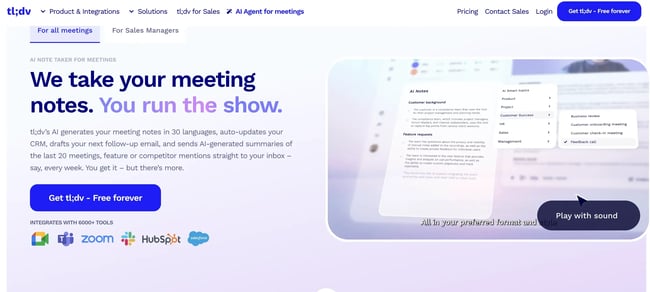
tl;dv is a meeting assistant that automatically records, transcribes, and summarizes virtual meetings. It offers AI-powered features that identify key points, action items, and decisions made during a conversation. This helps make meeting content searchable and easy to review.
The platform can join meetings on Zoom, Google Meet, or Microsoft Teams. It also integrates with CRMs and collaboration tools, allowing teams to link meeting insights directly to workflows and contacts. CRM-first workflows reduce manual data entry and disconnected notes.
Best for: Sales, customer success, and product teams.
I believe it can be particularly valuable for teams using tools like HubSpot, or Slack, as meeting insights can be synced directly into CRM records and communication channels.
Key Integration Strengths
- Native CRM integrations: tl;dv integrates seamlessly with CRMs like Salesforce and HubSpot. This integration eliminates manual data entry and ensures customer conversations are documented in the system of record.
- Calendar and meeting synchronization. The tool connects with Google Meet, Microsoft Teams, and Zoom, automatically transcribing and summarizing meetings scheduled through these platforms.
- Automation within collaboration tools. tl;dv integrates with Slack and Notion, facilitating the sharing of meeting summaries and action items across teams.
- Automation via Zapier: Beyond native connections, tl;dv lets users integrate with over 5,000 applications through Zapier, extending functionality to virtually any workflow tool teams already use.
Constraints
- Language support. The tool is primarily optimized for English-first users. They declare a 90-95% accuracy rate for clear speech, but the transcription accuracy may decrease for other languages, strong accents, or poor audio quality.
- Native integration limitations. As of late 2025, tl;dv offers only seven native integrations.
- Data storage and compliance. Transcripts are stored in tl;dv’s cloud, which may require review for compliance in highly regulated industries with strict data residency requirements.
- Pricing constraints: Advanced features, like CRM integration, AI summaries, and larger transcription minutes, are only available on paid plans.
3. Otter.ai
Otter.ai is a real-time meeting transcription and collaboration tool designed to make conversations instantly actionable. It automatically captures spoken content, highlights key moments, and generates concise summaries. Beyond transcription, it offers live captions, speaker identification, and searchable archives, making it easy to revisit discussions or pinpoint specific insights.
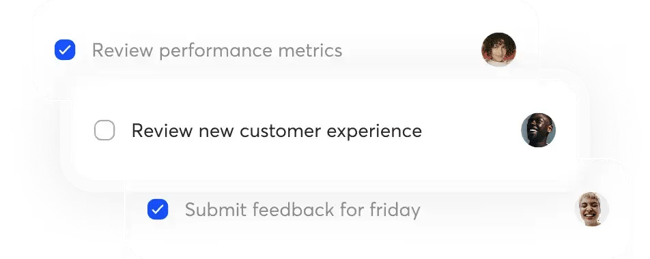
Users can comment directly within transcripts, which turns meeting content into a living workspace for collaboration and follow-ups.
Best for: B2B teams that have frequent calls and require automated meeting transcription and note-taking.
Key Integration Strengths
- Advanced CRM integrations. Otter.ai connects with leading platforms, allowing teams to sync meeting notes and transcripts into their CRM. For example, the HubSpot integration logs meeting transcripts and notes, pushing sales insights into customer records to support centralized data management and more informed decision-making.
- Otter notetaker AI agent. The platform integrates seamlessly with Zoom, Microsoft Teams, and Google Meet. Its OtterPilot Notetaker can automatically join meetings from these platforms to provide real-time transcription, live captions, and instant summaries.
- Notes can be saved automatically to relevant drives. Meeting notes and call transcriptions can be synced into Google Docs and Drive automatically, creating a centralized repository of meeting content that’s accessible across the organization.
Constraints
- Optimized for English only. Transcription may be less accurate for languages other than English or those with strong accents.
- Plan limitations. The Basic (Free) plan comes with certain limitations, including a transcription limit of 300 minutes per month and a maximum duration of 30 minutes per transcription. Users on this plan may also face restrictions on the number of integrations they can use simultaneously.
4. Fireflies
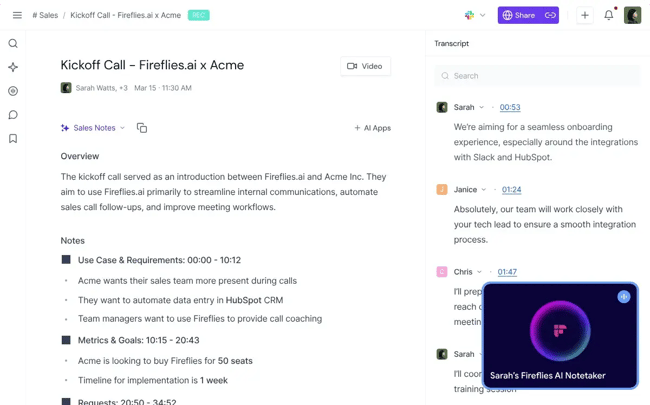
Fireflies.ai is an AI-powered meeting assistant that records or joins meetings (video + audio), transcribes conversations across 100+ languages, generates summaries, extracts action items and key insights, and provides searchable archives of conversations.
Best for: Sales, customer success, or product teams that have lots of calls across different formats and want to turn meetings into searchable, actionable content (e.g., “what did we decide?”, “who’s doing what?”).
Key Integration Strengths
- Broad conferencing platform support. Integrates with tools like Zoom, Google Meet, Microsoft Teams, dialers, and audio/video files.
- Analytics & search features. Provides talk-time tracking, sentiment and topic tracking, searchable transcripts to query specific meeting content, turning conversations into analyzable data.
Constraints
- Storage and Upload limits. The free and lower tiers have storage or upload limits. For example, the free plan has 800 minutes per seat stored, and uploads may be rate-limited.
- Meeting-bot duration limits: Depending on the plan, the Fireflies bot may automatically leave meetings after 2-4 hours.
- Accuracy and analytics limitations. Transcription accuracy may drop in noisy settings. Some deeper coaching and insight features are less mature.
- Custom workflow constraints. While many integrations exist, some users report that for custom workflows, additional setup or manual work is required
5. ClickUp
ClickUp AI Notetaker is an add-on for the wider ClickUp workspace platform. It automatically captures meeting notes, can join meetings, record them, and transcribe discussions.
All these assets gathered or generated during a meeting can be linked directly to ClickUp Docs, tasks, and chats. The tool supports automatic language detection and transcription in multiple languages, ensuring global teams can collaborate seamlessly.
Best for: B2B teams who are already using ClickUp for project or work management and international companies with multilingual teams, as ClickUp supports over 100 different languages.
Key Integration Strengths
- Deep connection with ClickUp’s own workspace. The tool is deeply embedded within the ClickUp ecosystem. Meeting transcripts are saved in private Docs, tasks can be generated automatically, and summaries link directly to active workflows.
- Multi-platform meeting support. Works with external meeting links from Zoom, Google Meet, and Microsoft Teams via ClickUp’s Planner or Calendar.
Protected data within integrations. ClickUp states that third-party AI providers do not store or train on customer data, supporting GDPR, ISO, and HIPAA standards for enterprise compliance and data protection.
Constraints
- Additional fees for AI features. Availability depends on the ClickUp workspace plan and the number of seats. Certain AI features may require additional fees beyond the base subscription.
- Best within the ecosystem. Because it’s inside the ClickUp app, teams that use meeting platforms or workflows largely outside ClickUp may find the seamlessness drops.
What to Look for in an AI Meeting Assistant for B2B Teams
The best AI meeting assistants for B2B sync with the team’s CRM and integrate with other elements of the tech stack. These tools also offer accurate action item routing and strong content retention across meetings. Additional capabilities determine whether an assistant simply transcribes calls or actually drives measurable business outcomes.
Syncing and Entity Mapping
CRM syncing automatically connects conversation details — such as contacts, deals, tickets, and next steps — to the correct records in sales and customer systems. Seamless CRM integration is the fastest way to prove ROI for AI meeting assistants. Accurate syncing eliminates manual data entry and keeps teams aligned on customer context.
Most of the B2B experts I spoke to mentioned seamless CRM integration as their number one factor when choosing an AI meeting assistant. When every conversation detail automatically lands in the right place, the assistant saves time and keeps teams on the same page.
Aaron Whittaker, VP of demand generation and marketing at Thrive Internet Marketing Agency, told me that his team used to spend five to seven hours each week manually updating their CRM. After implementing an assistant with deep, bidirectional syncing, it dropped to under ninety minutes.
“The assistant now parses every conversation, identifies deal stage changes, BANT or MEDDIC details, sentiment shifts, and next steps, then syncs them directly into the CRM within seconds,” he said.
Within a single quarter, Thrive achieved a 42% increase in CRM data accuracy, a 27% improvement in forecast reliability, and an 18% boost in deal velocity. Managers gained live visibility into opportunities, while reps had more time to engage clients.
Baris Zeren, CEO of Bookyourdata, also saw the difference rather quickly. For his team, implementing an AI assistant meant automatically incorporating action items and key decisions into the pipeline. Within weeks, the company spotted significant improvements in administrative efficiency and selling capacity.
Both Zeren’s and Whittaker’s stories demonstrate that, in a B2B context, the most effective AI meeting assistants seamlessly integrate with CRM and workflow tools.
Speed of Integrability With Existing Systems
Integration speed determines how quickly teams can realize ROI from AI meeting assistants. The question isn’t just whether the tool can connect to existing systems, but how rapidly it can do so without disrupting workflows or requiring extensive training.
Kevin Heimlich, CEO of The Ad Firm, explained that from his experience, “ROI is achieved rapidly if the adoption is successful and the tool doesn’t interfere with the workflow.”
The most effective assistants plug directly into CRMs and communication platforms, drawing real-time data without requiring retraining or duplicating data entry. For Heimlich’s team, integrating their AI assistant with HubSpot and Google Workspace cut administrative work by 40% in the first month.
Action Item Accuracy and Task Routing
Action item accuracy determines how effectively meeting decisions translate into completed work. Some industries — including legal, finance, and compliance — demand near-perfect records of meeting decisions and action items where accuracy directly improves follow-up speed and pipeline conversion.
Aziz Bekishov, CEO of DC Mobile Notary, shared that seamless integration with existing tools was critical for his remote and hybrid team. “The moment the assistant started synchronizing notes and follow-ups right into client records, our admin time went down, and we stopped communicating twice,” he said.
The AI assistant that his company uses connects directly with Google Workspace, Zoom, Slack, and CRM platforms, ensuring that meeting outcomes flow automatically into the tools teams already rely on. Action items are routed correctly, follow-ups are captured immediately, and team members can act on decisions without switching apps or re-entering information.
Aziz noted that even a powerful assistant can become a silo if it doesn’t integrate properly. For his team, accurate task routing and compatibility enabled early ROI, turning meeting insights into actionable tasks efficiently and reliably.
Conversation Intelligence for Coaching and Enablement.
Conversation intelligence turns everyday sales calls into insights. Instead of relying on hunches or scattered notes, teams get a clear view of what actually moves deals forward. It captures the patterns in tone, timing, and customer response that separate strong conversations from stalled ones.
Matt Bowman, CEO and Founder of Thrive Local, says this capability delivered the fastest ROI for his sales organization. “It changed how we handle performance at scale,” he explains.
Each call became actionable — something managers could review, learn from, and use to coach more effectively. Within one quarter, Thrive Local shortened new-hire ramp time by nearly 30% and lifted win rates by about 14%.
The impact reached beyond coaching. Conversation intelligence also removed repetitive admin work by syncing deal updates and follow-ups directly into the CRM. That saved each rep several hours a week and improved forecasting accuracy by roughly 20%.
Data Governance, Consent, and Access Controls
Every meeting tool promises productivity, but few talk about protection. Data governance and access controls determine who can view meeting content and how that information is protected. For B2B teams handling sensitive client or financial data, security, consent, and access controls form the baseline for trust rather than optional features.
Alex Kugell, Chief Technology Officer at Trio, puts it simply: “You should always put security first.” Working with sensitive financial data, he’s seen what happens when shortcuts are taken. His advice is to look for end-to-end encryption, clear permission settings, and transparent data policies. Certifications such as SOC 2 or ISO 27001 should be table stakes.
“Don’t settle for vague answers,” Kugell adds. “You need to know your meeting notes and recordings are safe and only available to the people who actually need them.”
For teams evaluating AI assistants, simplicity and clarity in security design matter more than an extra set of flashy features. A tool that treats data protection as part of the workflow – not an afterthought – builds confidence and keeps the business on solid ground.
Content Retention
Most teams measure an AI meeting assistant by how clearly it can capture what was said. Content retention determines how well an AI assistant remembers and connects information between meetings.
While accuracy in capturing what was said matters, the real impact comes from tracking progress, recalling past decisions, and keeping conversations moving forward instead of starting from zero each time.
As John Beck, attorney and Founding Partner at Beck & Beck, explains, “that’s where productivity compounds.” In his legal practice, continuity between discussions turns follow-up meetings into action sessions. When an assistant can carry context forward, linking notes, outcomes, and next steps, it creates a rhythm that saves time and reduces miscommunication. The best systems keep the story straight, so teams can focus on execution instead of recap.
The same principle shapes HubSpot’s AI tools, including Breeze, designed to help teams carry context from one conversation to the next and act faster on what matters.
Frequently Asked Questions About AI Meeting Assistants
Are AI notetakers accurate enough for sales and legal follow‑ups?
AI notetakers can be accurate enough for sales and legal follow-ups when outputs are reviewed. For sales, AI effectively captures action items and key points, but teams should review notes before sending client follow-ups. For legal use, the Boston Bar Association recommends that U.S. lawyers validate AI-generated notes against original recordings, especially for privileged or sensitive content.
Recommended guardrails include limiting AI use to non-sensitive meetings, ensuring secure storage, and confirming participant consent. Human review is essential for legal matters and recommended for critical sales meetings to confirm accuracy and interpret nuance.
Will an AI meeting assistant record in‑person meetings?
Yes, many AI meeting assistants can capture in-person meetings using device microphones, though recording quality depends on placement and environment. Omnidirectional microphones are ideal for picking up voices from different directions.
How do I handle attendee consent for recorded or AI‑assisted meetings?
Handle attendee consent by getting clear verbal or written consent at the start of calls using a standard disclosure script, such as: “Before we begin, this meeting will be recorded and processed with an AI assistant to help with notes and follow-ups. The recording will be used only for our internal purposes. Is everyone okay to proceed?”
Respect customer-specific rules (some require written consent or legal approval before AI tools join calls) and account for regional compliance requirements. The safest approach is to always request explicit consent, even when not legally required.
Can an AI meeting assistant update my CRM without breaking data hygiene?
Yes, AI assistants can safely update CRM records when fields are mapped correctly and governance rules are in place. Map AI outputs to the correct CRM objects. Keep AI summaries in notes rather than core fields. And, lock down critical fields, like lifecycle stages, so AI cannot change them.
Add a lightweight review workflow where AI creates notes and tasks in draft mode, and reps approve them before syncing. This keeps humans in control without slowing down the workflow.
What’s the best way to onboard the team without meeting fatigue?
Start with a focused two to four-week pilot using a single team and one or two meeting types. Define success upfront, like faster follow-ups, no missed action items, and fewer manual notes. Provide shared templates to ensure consistent AI outputs and prevent messy formatting across users.
Keep training lightweight: a 30- to 45-minute kickoff demo in Week 1, 10- to 15-minute weekly retrospectives in Weeks 2-3, and a results review in Week 4. Scale only after the pilot proves value and improvements from the pilot phase are implemented.
Choose an AI meeting assistant that works for your team.
The best solution must go beyond basic transcription to become a productivity multiplier for B2B teams. Look for platforms that connect directly to CRMs and workflow tools, automatically syncing contacts, deals, and action items so insights land where teams already work. Prioritize accuracy in action item routing, consistent summaries, and strong data governance to protect sensitive client information.
HubSpot’s Meeting Assistant, built into Sales Hub, delivers these capabilities natively. It surfaces attendee insights, deal details, and company information before each call so teams arrive prepared. After meetings, it automatically suggests follow-ups — all tied directly to HubSpot CRM records without manual data entry.
Ready to eliminate manual note-taking and improve CRM data quality? Start with HubSpot’s free tools or schedule a demo to see Sales Hub in action.