What to Look for In An AI Meeting Scheduling Tool for Sales
When evaluating AI schedulers for your team, focus on features that directly impact pipeline velocity and rep productivity. These features include everything from CRM integration to intelligent lead routing.
Deep CRM Integration
The best AI scheduling tools don’t just add events to a sales rep’s calendar. The most effective tools deeply integrate with the existing CRM. Look for solutions that bi-directionally sync with the team’s sales platform, logging every interaction, updating contact records, and triggering follow-up sequences without manual data entry.
HubSpot’s meeting scheduler exemplifies this approach. Built natively into Sales Hub, it automatically compiles pre-meeting context from CRM records, recent engagement, and past interactions. After meetings, the AI flags next steps and generates tailored follow-ups — all while maintaining a unified view of every prospect’s journey. This level of integration eliminates the gap between scheduling and selling that standalone tools often create.
Intelligent Lead Routing and Qualification
An AI scheduling tool should route the right leads to the right reps based on territory, expertise, availability, and deal characteristics. Advanced systems can even qualify leads before booking, asking qualification questions that determine which rep or meeting type makes the most sense.
With round-robin scheduling that distributes meetings fairly across the team and rules-based routing that considers multiple factors, HubSpot’s AI meeting tool ensures prospects connect with the first available qualified rep. For complex deals involving multiple stakeholders, group scheduling coordinates everyone in a single click — essential for demos and technical onboarding calls.
AI-Powered Meeting Prep and Follow-Up
When sales reps are short on time, meeting prep gets rushed, and they end up joining a call without full context. AI meeting schedulers help alleviate this pain point by pulling together recent emails, CRM activity, and relevant notes. Post-meeting sales automation is just as important. Tools that draft follow-up emails, log notes, and create tasks keep deals moving without administrative drag.
HubSpot AI handles both sides of this equation automatically. Before meetings, it compiles customer context, including any prior call recordings, engagement history, and suggested talking points. After meetings, it identifies critical next steps, logs comprehensive notes, and helps generate personalized follow-ups that maintain momentum while saving reps valuable selling time.
Real-Time Availability and Buffer Management
Sales schedules change constantly. The scheduling tool needs to reflect current availability across multiple calendars, prevent double-booking, and protect reps from burnout with intelligent buffer time between calls. The system should also handle time zones automatically and adapt when plans shift.
Patrick Calder, marketing director of Distillery, suggests that AI features around availability are the most helpful for saving time around coordination.
“I’ve found that some of the most useful AI features, like intelligent availability checking and auto-timezone detection, pave the way for reduced ‘meeting scope,’” he says. “For rescheduling, AI can automatically propose new times and handle that, which helps lower the overhead.”
For example, HubSpot’s AI meeting scheduler syncs in real-time with Google and Office 365 calendars, ensuring prospects only see genuinely available slots. This real-time integration means no manual availability updates, no embarrassing double-bookings, and seamless coordination as a team’s schedule evolves throughout the day.
Best AI Meeting Scheduling Tools for Sales Teams
Based on core features, sales-specific functionality, and user feedback, the table below compares the top AI meeting scheduling tools for sales teams at a glance. Full breakdowns follow.
|
Tool |
Best For |
Standout Feature |
Free Plan |
Starting Price |
|
HubSpot Meeting Scheduler |
Sales teams wanting native CRM integration and AI-powered prep and follow-up |
Built-in AI meeting assistant that compiles prospect context and drafts follow-ups automatically |
Yes |
$90/seat/month (Sales Hub Professional, billed annually) |
|
SchedulerAI |
High-velocity sales teams with high inbound volume needing 24/7 booking automation |
Conversational AI that books, proposes times, and qualifies leads across email, Slack, SMS, and web forms |
No |
Custom pricing |
|
Calendly |
Sales teams needing a simple, broadly compatible scheduler with strong workflow automation |
Routing and round-robin scheduling with integrations across 700+ tools |
Yes |
$10/user/month |
|
Reclaim.ai |
Sales teams struggling with meeting fatigue who need calendar optimization alongside external scheduling |
AI-powered focus time protection that balances rep availability with productive work time |
Yes |
$10/user/month |
1. HubSpot Meeting Scheduler
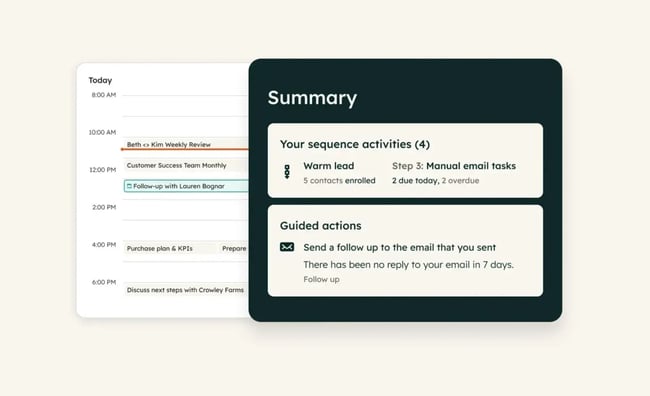
HubSpot’s meeting scheduler stands out for its seamless integration with the broader sales ecosystem. Because it lives inside a company’s CRM rather than as a separate tool, every scheduled meeting automatically enriches your contact records.
The AI meeting assistant pulls together prospect context before calls and drafts intelligent follow-ups afterward. Conversation intelligence is a core functionality that enables sales reps to close deals faster. For teams already using HubSpot or planning to consolidate their stack, this represents the most integrated scheduling experience available.
Core Features
- Native CRM integration with automatic activity logging
- AI meeting assistant for prep and follow-up automation
- Round-robin and group scheduling for team coordination
- Real-time calendar sync that integrates with Google and Office 365
- Customizable booking pages with branding
- Automated reminders and confirmation emails
Pricing: Free tier available with basic features; advanced AI capabilities and automation included in Sales Hub Professional (starting at $90/month per seat, billed annually) and Enterprise editions
What I like: HubSpot’s meeting scheduler is a free tool within Sales Hub, a comprehensive AI sales platform that enables sales teams to manage leads, automate multi-channel outreach, and accelerate revenue growth in one place.
2. SchedulerAI
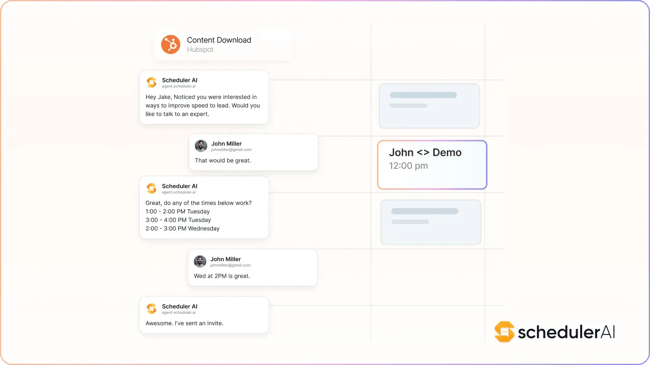
SchedulerAI removes scheduling friction through conversational AI that interprets intent and converts it into booking actions. Unlike traditional scheduling links, it can handle complex multi-party coordination across channels that prospects already use.
SchedulerAI integrates with CRMs like HubSpot Sales Hub, making it well-suited to existing sales stacks. Additionally, the AI’s ability to qualify leads before booking prevents wasted rep time on unqualified prospects.
Core Features
- AI copilot that books, proposes times, and rebooks automatically
- Multi-channel coordination (email, Slack, website forms, SMS)
- Meeting recording and automated note generation
- Lead qualification and routing capabilities
- HubSpot integration for CRM sync
- Time zone coordination and reminder automation
Pricing: Custom pricing based on team size and features; designed for established go-to-market teams needing 24/7 booking automation
Best for: All of these features make this tool particularly valuable for high-velocity sales teams with high inbound volume.
3. Calendly
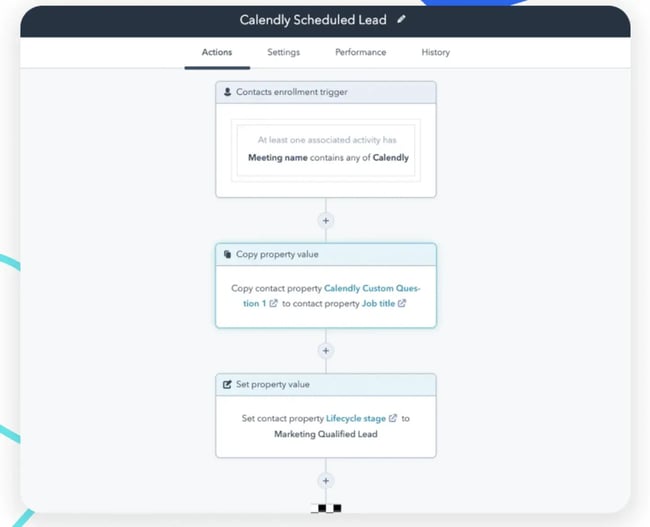
Calendly pioneered the modern scheduling link and continues to lead in ease of use and broad integration support. The Teams plan brings sophisticated routing that‘s straightforward to configure, making it accessible for sales operations teams without deep technical expertise. While it doesn’t offer the depth of HubSpot’s native CRM, Calendly integrates well with major sales platforms and provides robust workflow automation that keeps prospects engaged throughout the booking journey.
Core Features
- Unlimited event types
- Team scheduling with routing and round-robin
- Workflow automations for pre/post-meeting communication
- Integrations with over 700 tools via Zapier
- Customizable booking pages and branding
- Buffer time and meeting limits for availability control
Pricing: Free plan available; paid plans starting at $10/month per user.
What I like: Calendly’s simple UX and interface make it easy to use for sales teams and prospects alike.
4. Reclaim.ai
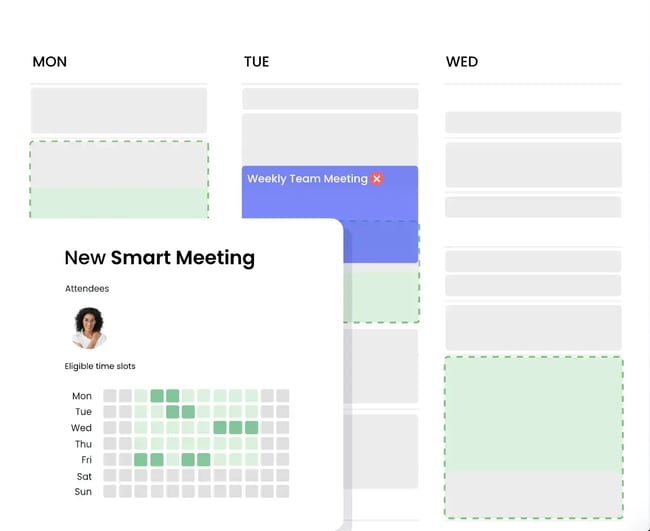
Reclaim.ai takes a different approach by optimizing entire calendars rather than just external meetings. It automatically defends focus time for important work while still making reps available for high-priority prospect calls. The AI learns patterns and adapts schedules dynamically when conflicts arise.
For sales teams struggling with back-to-back meeting fatigue and insufficient time for deal preparation, Reclaim offers a holistic solution that balances availability with productivity.
Core Features
- Auto-scheduling of tasks, habits, and meetings
- Smart calendar optimization and focus time protection
- Scheduling links with priority-based availability
- Calendar sync across Google and Outlook
- Team analytics and productivity insights
- Meeting buffer automation
Pricing: Free available; paid plans start at $10/month per user.
What I like: Reclaim’s focus on productivity can help overloaded sales teams maximize availability and make better use of their time.
How to Evaluate AI Scheduling Assistants and AI Calendar Tools for Sales
Choosing the right scheduling tool requires systematic evaluation beyond feature lists and pricing. Use these criteria to test whether a solution will actually work for your sales team.
Test with real sales workflows.
Set up actual scenarios the team encounters daily: high-intent inbound leads, complex multi-stakeholder demos, reschedules, time zone complications, and last-minute availability changes. The tool should handle these gracefully without manual intervention. Pay attention to how many clicks it takes to complete common tasks and whether the interface feels intuitive for reps who already have tool fatigue.
Measure CRM data quality impact.
Poor scheduling tools create data hygiene problems that compound over time. During your trial period, audit how completely meeting data flows into the CRM. Consider the following questions:
- Are contact records updated accurately?
- Do activities log with enough detail for reporting?
- Does the integration work bi-directionally so that changes in the CRM are reflected in the scheduler?
Sales operations leaders should evaluate tools based on the data quality they deliver, not just the convenience they promise.
Assess team adoption indicators.
Involve actual sales team members in the evaluation, not just managers. Watch for signs of adoption friction, such as confusing setup processes, unclear routing rules, or booking pages that don’t align with brand standards. Tools that require extensive training or constant troubleshooting rarely deliver the expected ROI. Look for solutions that reps can start using productively within hours, not weeks.
Analyze the impact on speed-to-lead.
In sales, time kills deals. Measure how quickly prospects can get from initial interest to booked meeting using each tool. The best AI schedulers reduce this to minutes by offering immediate availability, smart routing, and automated confirmations. Track conversion rates from booking page visit to completed meeting — this metric reveals which tools create buyer confidence and which introduce friction that costs teams opportunities.
Verify scalability and governance controls.
Scheduling needs will evolve as the team grows. Test whether the tool handles increasing volume without performance degradation. Evaluate admin controls for managing team settings, enforcing consistent branding, and maintaining compliance with the company’s security requirements. Adding new reps, adjusting routing rules, and changing availability policies without disrupting existing bookings are all signs of a scalable tool. Enterprise sales teams especially need solutions that scale gracefully under organizational complexity.
When to Choose A CRM-Native AI Scheduler vs. A Standalone Tool
The CRM-native versus standalone decision significantly impacts a team’s efficiency and data integrity. Consider these factors when making this strategic choice.
Stack complexity and integration overhead.
Sales teams already managing over 10 sales tools should think carefully before adding another standalone system. Each additional platform creates integration points to maintain, data sync issues to troubleshoot, and user confusion about where information lives.
CRM-native schedulers, like HubSpot’s, eliminate this complexity by living where sales data already resides. Reps access scheduling, contact management, email tracking, and deal pipeline in one interface rather than context-switching between applications.
However, if your CRM lacks strong native scheduling or your organization uses different systems across departments, a standalone tool with broad integration support might serve you better. Solutions like Calendly and SchedulerAI integrate with multiple CRMs, making them viable for organizations with heterogeneous technology stacks or teams that need scheduling capabilities beyond what their CRM provides.
Governance and compliance requirements.
Enterprises with strict security, compliance, or data residency requirements often favor CRM-native solutions because they reduce the number of systems touching customer data. When scheduling lives on the same platform as the CRM, organizations benefit from unified governance policies, a single audit trail, and simplified compliance reporting. This matters significantly for organizations in regulated industries or those handling sensitive prospect information.
Standalone tools can meet enterprise security standards — many offer SOC 2 compliance, SSO, and data encryption — but they multiply the systems a security team must monitor and audit. For governance-heavy organizations, this administrative burden tips the scales toward consolidation.
Team maturity and change management capacity.
Consider the team’s bandwidth for adopting new tools. Mature sales organizations with dedicated operations teams can successfully implement and optimize standalone scheduling platforms, customizing integrations and workflows to fit complex needs. These teams have the technical capacity to maintain multi-tool stacks and train reps on distinct systems.
Newer sales teams or those without dedicated operations support often struggle with tool sprawl. For these organizations, CRM-native scheduling reduces change management challenges by enabling reps to learn a single comprehensive platform rather than juggling multiple applications. The learning curve flattens when scheduling is just another feature of a familiar CRM rather than an entirely separate system.
Feature gap analysis.
Sometimes the decision comes down to capabilities. If a CRM’s native scheduler lacks critical features — advanced lead qualification, complex routing logic, or specific integrations a sales team requires — a standalone tool may be necessary regardless of stack complexity concerns. Evaluating must-have features versus nice-to-have ones helps narrow the decision.
It’s worth noting that HubSpot offers integrations with many AI scheduling tools, allowing teams to combine the benefits of a consolidated CRM with specialized scheduling capabilities when needed. This hybrid approach — using HubSpot’s native scheduler for most workflows while integrating specialized tools for specific use cases — often provides the best of both worlds.
FAQs About AI Meeting Scheduling for Sales Teams
How do AI scheduling assistants handle conflicting calendars?
AI scheduling tools sync with multiple calendar sources simultaneously — typically Google Calendar, Office 365, and sometimes Apple Calendar — to maintain a unified view of availability. When someone books a meeting, the system checks all connected calendars in real-time to prevent conflicts. Advanced schedulers like HubSpot go further by allowing teams to set priority levels for different event types and automatically reschedule lower-priority blocks when important sales meetings are booked.
The best tools also handle edge cases gracefully, accounting for travel time, time zone preferences, and buffer needs while updating availability instantly as schedules change. Real-time synchronization ensures prospects always see accurate availability, eliminating double-bookings that damage professional credibility.
Can AI appointment scheduling tools qualify leads before booking?
Yes, modern AI schedulers can qualify leads through intelligent pre-booking questions and routing logic. Tools like SchedulerAI and HubSpot allow teams to configure qualification questions that prospects answer when booking. Based on their responses, the system routes them to appropriate reps or meeting types, or in some cases, directs unqualified leads to alternative resources.
HubSpot’s scheduler leverages CRM data to further enhance qualification. It can check existing contact records, previous engagement history, and deal stage to automatically make smart routing decisions. This prevents senior closers from spending time on early-stage discovery calls while ensuring high-value prospects get immediate access to the best resources. The AI learns from patterns over time, continuously improving qualification accuracy and routing efficiency.
What is the best way to reduce no-shows with AI reminders?
Strategic reminder sequences make the biggest difference. Multiple touchpoints — typically one week, one day, and one hour before the meeting — significantly reduce no-shows. AI schedulers automate this completely, sending personalized reminders via email and SMS that include meeting details, join links, and even agenda items to build anticipation.
HubSpot’s AI meeting assistant takes this further by including relevant context in reminders such as recent conversations, pending questions, or materials to review before the call. This transforms generic reminder emails into value-added communications that prospects appreciate.
Making rescheduling easy within reminder emails also gives prospects a low-friction alternative to skipping the meeting. One-click rescheduling preserves relationships and keeps opportunities alive when conflicts arise.
How long does implementation usually take?
Implementation timelines vary based on the chosen solution and organizational complexity. CRM-native schedulers like HubSpot can be up and running within a few hours — connecting calendars, configuring availability rules, and creating booking pages requires minimal technical expertise. Full optimization with custom routing logic and team onboarding typically takes one to two weeks. Standalone tools follow a similar pattern, though organizations with complex tech environments or strict security requirements should expect several weeks as IT teams configure SSO and ensure compliance. Strong sales operations involvement from day one is the key accelerator.
Will this integrate with my CRM and sequences?
Integration depth varies significantly across tools. HubSpot’s native scheduler offers the deepest integration — meetings automatically trigger sequence enrollment, update contact properties, and influence lead scoring without additional configuration. Standalone schedulers like Calendly and SchedulerAI integrate with major CRMs and handle core tasks well, but sophisticated requirements like custom field mapping or bi-directional sync may require additional configuration or middleware tools like Zapier. Testing the integration with an actual CRM instance before committing is the best way to verify data quality and sync reliability.
AI-Powered Scheduling for Sales Teams
AI meeting scheduling tools for sales teams have evolved from simple booking links into sophisticated sales acceleration platforms. The right solution eliminates scheduling friction, improves CRM data quality, and recovers hours each week for selling rather than calendar coordination.
The decision comes down to integration depth, team needs, and strategic priorities. CRM-native solutions like HubSpot’s meeting scheduler offer unmatched integration and data consistency, while standalone tools provide strong alternatives with distinct advantages across conversational AI, broad integrations, and calendar optimization. The common thread across successful implementations is choosing tools that sales teams will actually adopt and that integrate cleanly with the existing stack.